
SQL Server 2025: Microsoft has rolled out SQL Server 2025, and it’s packed with features that make life easier for developers, DBAs, and businesses. If you’ve been waiting for better performance, bigger hardware support, and smarter tools, this update is worth your attention. Let’s break down the highlights in simple terms.
1. Standard Edition Gets a Big Boost
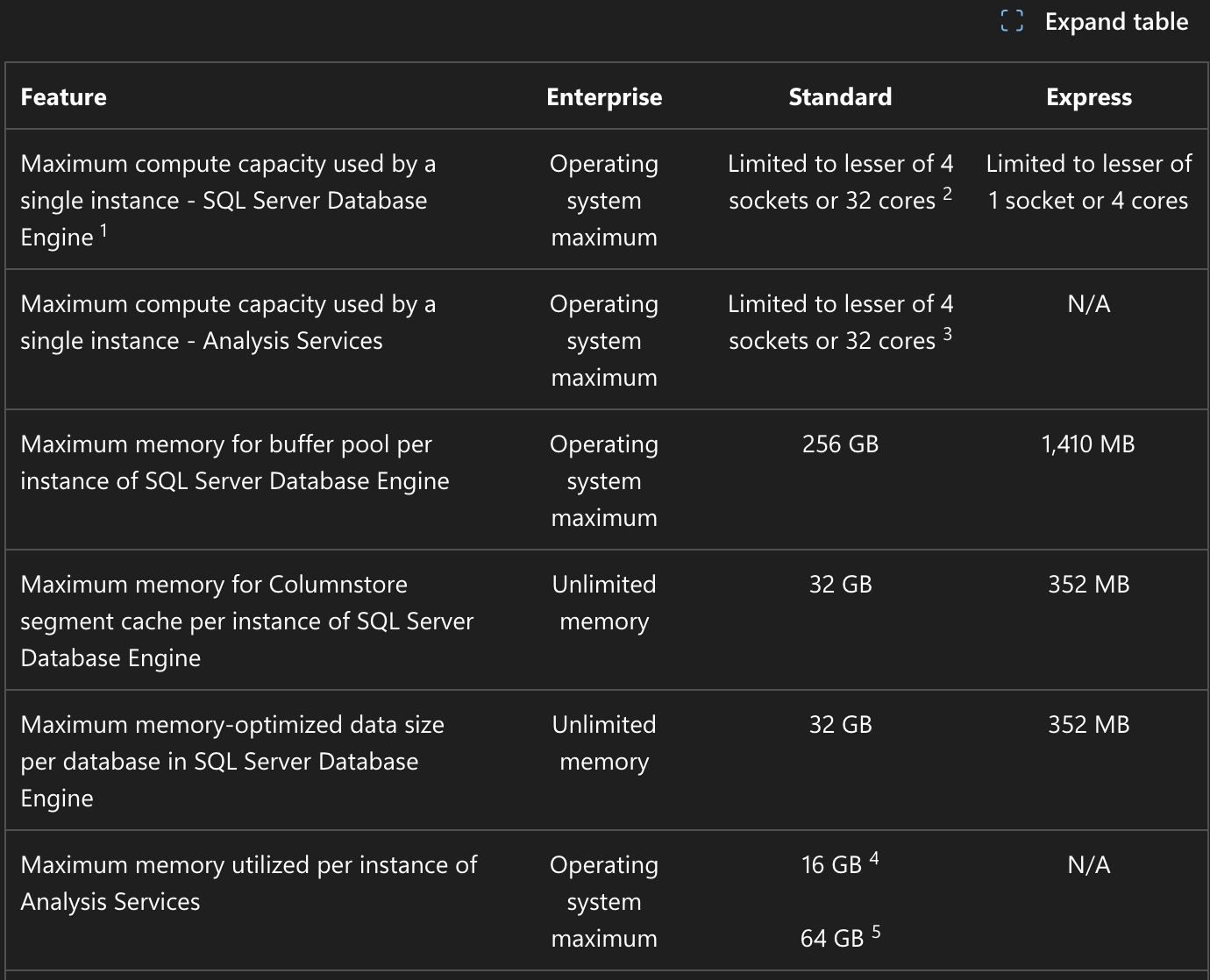
Earlier, the Standard Edition had strict limits on RAM and CPU cores. With SQL Server 2025:
- You can now use up to 256 GB RAM.
- It supports 32 cores. This means mid-sized businesses can handle larger workloads without jumping to the expensive Enterprise edition.
2. Faster Performance and Scalability
SQL Server 2025 focuses on speed:
- Improved query execution for heavy workloads.
- Better parallel processing for analytics and reporting. If your applications deal with big data or real-time dashboards, this upgrade will make a noticeable difference.
3. Stronger Security
Data security is a top priority, and Microsoft has added:
- Advanced encryption options.
- Compliance tools for laws like GDPR and India’s DPDP Act. This ensures your sensitive data stays protected and meets legal requirements.
4. Hybrid Cloud Made Simple
Running workloads on both on-premises servers and Azure is now easier:
- Seamless integration with cloud services.
- No complicated configurations. Perfect for businesses moving towards cloud but still keeping some data local.
5. AI-Powered Query Optimization
SQL Server 2025 uses AI to:
- Automatically tune queries.
- Reduce manual performance tweaks. This saves time for DBAs and improves overall efficiency.
- SQL Server 2025 now supports advanced vector search directly inside the database engine. It uses SQL security and the familiar T-SQL language, so you don’t need a separate vector database. You can combine this with your normal search to create a powerful hybrid search experience.
- Users can choose their preferred AI embedding model, whether on-premises or in the cloud, and use T-SQL to turn existing data into an intelligent search application. The best part? AI models run isolated from the engine, and all data exchange is secure and encrypted.
6. Cost Benefits
With the Standard Edition upgrade, many companies can avoid costly Enterprise licenses. This is a big win for small and medium businesses in India.
7. Connect to Azure and Upgrade Your Tools
Many businesses want to use Azure benefits without fully moving to Azure. Azure Arc is the perfect solution for hybrid setups. It even supports Microsoft Entra Managed Identity, both inbound and outbound, so you can go passwordless with Managed Identity.
Just like SQL Server 2022, SQL Server 2025 supports Azure SQL Managed Instance Link in versioned mode. This gives you a bi-directional managed disaster recovery solution, making your setup more reliable.
8. Use the Latest SSMS
If you haven’t updated SQL Server Management Studio (SSMS) recently, you’ll be surprised. SSMS 21 launched in May 2025, and now SSMS 22 is already available at https://aka.ms/ssms.
SSMS 22 comes with:
- GitHub Copilot assistance
- Windows ARM64 support
- Multiple color themes (including dark mode)
- JSON viewer
- Query hints recommendation
- New VS Installer/update experience
- New Connection dialog
- Zooming for grid results
These updates make SSMS more powerful and user-friendly than ever.
Start Testing SQL Server 2025 Safely
Earlier, we used to say, “Wait for Service Pack 1 before moving to production.” Things have changed now. Microsoft has improved compatibility levels a lot. You can install SQL Server 2025 in your development environment, but keep your databases at the same compatibility level as production. This way, most query plans will behave the same.
At the same time, tell your developers not to use new data types, functions, or T-SQL features from 2025 until you are confident about running it in production. Use development servers as testbeds for monitoring tools, linked servers, replication, and other components. Start testing in low-load environments now, without worrying about small bugs—they will get fixed in the first few updates.
The sooner you start using 2025 in development, the faster you’ll gain confidence for a smooth production rollout.
Why Upgrade Now?
If you’re on an older version, upgrading to SQL Server 2025 means:
- Better performance.
- Stronger security.
- Future-ready cloud integration.
Next>> Configure SQL Server Failover Cluster (High Availability) – Best Way!
